
A WordPress SEO audit is a structured review of how well search engines can crawl, index, understand, and rank your site, and how well each page serves the person who lands on it. It covers technical setup, on-page elements, content, images, internal links, schema, speed, and conversions. Done right, it tells you what to fix first.
Mike B.
Founder
July 16, 2026
WordPress SEO
18 min read
+ interactive checklist
We run these audits every week, on our own sites and on client sites. The pattern almost never changes. Somebody hands us a 200-item report from a crawler, everyone stares at it, and nothing gets fixed for three months.
So let’s skip that. This is the checklist we actually use, in the order we actually use it.
Quick answer
A WordPress SEO audit is a systematic review of a site's technical setup, page-level optimization, content, links, structured data, speed, and conversion paths. Its job is to find anything stopping your important pages from being discovered, understood, ranked, clicked, or converted.
Here's the part most audits get wrong. A list of errors is not an audit. A list of errors is homework nobody does.
A real audit sorts the mess. It separates the things that are costing you money right now from the things that would be nice to clean up someday. A noindexed service page is an emergency, because that page cannot appear in search at all. A title tag that runs eight characters too long is a Tuesday afternoon job, not a crisis. Both might show up as "issues" in the same report, and that's exactly why raw reports are so easy to ignore.
Every audit we run answers six questions:
| # | The question | What we look at |
|---|---|---|
| 1 | Can search engines reach the site? | Indexability, robots rules, sitemaps, canonicals, redirects, crawl errors |
| 2 | Can they understand each page? | Titles, headings, topic focus, internal links, schema, structure |
| 3 | Does the page match what the searcher wants? | Intent match, format, offer, depth |
| 4 | Is the experience fast and usable? | Core Web Vitals, mobile layout, images, scripts, forms |
| 5 | Is the content current and trustworthy? | Thin, outdated, duplicate, or unsupported content |
| 6 | Does the visitor know what to do next? | Navigation, internal links, CTAs, forms, conversion pages |
Answer those six honestly and you have an audit. Everything below is just how we answer them.
Quick answer
WordPress gives you a flexible publishing platform. It does not give you a site that is technically clean, fast, well-structured, or matched to search intent. Themes, plugins, settings, and five years of content decisions do that, and they drift.
That drift is the whole reason audits exist. Nobody breaks a WordPress site on purpose. It happens one small decision at a time: a plugin gets installed, a page builder gets updated, a freelancer publishes six posts about the same topic, a redesign moves 40 URLs.
These are the problems we find over and over:
noindex to important posts, categories, or landing pages.The more your site changes, the more an audit pays for itself. A five-page brochure site can coast. An agency site, an ecommerce store, or a multi-author blog cannot, and for those teams SEO quality control belongs in the operating routine, not in a once-a-year project folder. If you're not sure which camp you're in, tell us what your site looks like and we'll point you at the right cadence.
Quick answer
A WordPress SEO audit should cover technical SEO, on-page SEO, content, plugin and theme configuration, images, internal links, structured data, page experience, AI-search readiness, and conversions. Then it should rank every finding by impact, effort, and page value.
That last sentence is the one that matters. Coverage is easy. Prioritization is the work.
Any crawler can hand you 200 issues. The question nobody answers is which three to do on Monday. So here's the map we use, area by area, with the question each one exists to answer and what you should walk away holding.
| Audit area | The core question | What you end up with |
|---|---|---|
| Technical SEO | Can bots reach, render, and index the right URLs? | Blocking issues, crawl errors, redirect and canonical fixes |
| On-page SEO | Does the page target and satisfy a real query? | Title, heading, metadata, content, and CTA changes |
| Content SEO | What gets refreshed, merged, expanded, or removed? | A prioritized content action plan |
| Plugins and theme | Is WordPress producing clean, fast, consistent output? | Config fixes, conflict list, performance actions |
| Images | Are images useful, accessible, compressed, and stable? | Alt text, format, size, and loading fixes |
| Internal links | Can users and crawlers reach priority pages? | Orphan fixes, anchor changes, topic-cluster links |
| Structured data | Does markup match what's visible, without conflicts? | A validated schema map and duplicate cleanup |
| GEO/AEO | Can answer engines extract a clear, supported answer? | Direct answers, FAQs, tables, citations |
| Conversion | Does organic traffic have an obvious next step? | CTA, form, proof, and journey improvements |
Ten areas looks like a lot until you notice they run in a sequence. Each one depends on the one above it being true. There's no point rewriting a title tag on a page that returns a 404, and no point polishing schema on a page that answers the wrong question.
Score every finding before you touch anything. We rate each one on four things: business impact, effort to fix, the value of the page it sits on, and the risk of breaking something else. An issue that scores high on the first three and low on the fourth goes to the top of the list.
Everything that fails that test gets parked. Not deleted, parked. Most audits die because nobody was allowed to say "later."
SEO AI Audit Tool runs the technical and on-page checks inside your WordPress dashboard, then turns the findings into an action list your team, or your VA, can work through. No tab-hopping between four tools.
Quick answer
Run a light audit monthly and a full audit quarterly. Audit immediately after a migration, redesign, theme change, SEO-plugin change, big content launch, security incident, traffic drop, or Search Console warning.
Frequency should follow risk, not the calendar. A site that publishes twice a week and runs three plugin updates a month breaks in ways a static brochure site never will. Here's the rhythm we use with clients:
| Cadence | What we check | Time cost |
|---|---|---|
| Weekly | Uptime, indexing alerts, manual actions, security, traffic anomalies, broken forms | 15 minutes |
| Monthly | Priority pages, new content, titles and metas, internal links, 404s, Core Web Vitals trends, Search Console performance | 1–2 hours |
| Quarterly | Full technical, content, schema, plugin, theme, image, and conversion review | Half a day to several days |
| Annually | Site architecture, taxonomy, keyword-to-page mapping, historical content, templates, tool stack | 1–2 days |
A news site and a five-page plumber site do not need the same schedule. Match the effort to what's actually at stake.
Quick answer
Combine automation with targeted human review. Use a crawler or a WordPress SEO audit plugin to find patterns, pull in Google Search Console data, then manually review only your highest-value pages for intent, accuracy, trust, and conversion quality.
Do not start at the top of the error list and work down alphabetically. That's how teams spend a week fixing alt text on blog posts from 2019 while the money pages sit broken.
Start where the business lives:
Speed still needs judgment. Automation spots a missing H1 in half a second. It cannot tell you whether the page deserves to exist, whether the offer is any good, or whether the writer actually knows the subject.
Quick answer
Yes. AI is good at repetitive checks, pattern summaries, structure review, intent classification, draft metadata, and turning findings into tasks. It should support technical testing, fact-checking, and business judgment, not replace them.
The catch is context. Generic prompts give generic advice, which is why so much AI SEO output reads like a horoscope. Feed it the business model, the audience, the service area, the target query, the page's job, and the conversion goal, and the recommendations get noticeably sharper.
Where AI earns its keep: checking 300 pages for the same six problems, classifying intent across a whole content library, spotting structural patterns a human skims past, and rewriting an error list into tasks a VA can actually action.
Where it doesn't: confirming that Googlebot rendered your page, deciding whether a service page is worth keeping, verifying a claim about your own product, or knowing that your best lead source only gets 40 visits a month.
One thing worth knowing before you rebuild your strategy around AI search: Google says the same SEO fundamentals apply to AI Overviews and AI Mode, and there's no special tag or shortcut for getting included. Their guidance on AI features and your website is short, and worth reading before you buy anything that promises AI rankings.
SEO AI Audit Tool sends your page content to AI with your business context attached, so the suggestions fit your services, your audience, and your offer. Then it flags which pages have the most upside.
Quick answer
A technical audit confirms that search engines can access, render, and index the right version of every important page, without burning crawl budget on broken, blocked, or duplicate URLs.
This is where you always start, because nothing else matters if the page can't be reached. Work through the list first, then read the four sections underneath it for the checks that cause the most damage when they're wrong.
noindex on important pagesrobots.txt doesn't block pages, CSS, JS, or images needed for renderingOpen Settings › Reading and check that "Discourage search engines from indexing this
site" is off. Then look at the real HTML source and HTTP headers of a few pages for noindex,
nofollow, nosnippet, or a restrictive X-Robots-Tag.
WordPress documents exactly how this setting behaves in its Reading Settings documentation, and it's worth reading the fine print: unchecking the box removes one block. It does not promise indexing.
How to fix it: strip accidental noindex directives from money pages, keep staging and cart and account pages protected, and confirm the live URL with Search Console's URL Inspection tool. Check headers as well as meta tags, because plugins can set either.
Visit /robots.txt and confirm it isn't blocking content or the CSS and JavaScript needed to
render your pages. Then load your XML sitemap and check that it only contains canonical, indexable URLs you
actually want found.
A common trap: robots.txt controls crawling, not indexing. A blocked URL can still land in the index through external links.
If you need a page out of search, leave it crawlable and use noindex, or lock it behind real
authentication. Blocking it in robots.txt means Google can never read the noindex you added.
How to fix it: remove redirected, noindexed, 404, and low-value URLs from the sitemap. Keep
lastmod honest instead of letting a plugin bump it every night. Make sure a caching or security
plugin isn't serving a stale sitemap.
WordPress is generous with duplicate paths. Archives, feeds, attachment pages, query parameters, filters, print views, and plugin endpoints all create extra URLs. A canonical tag is a hint, not a rule, so don't rely on it to clean up structural duplication forever.
Make your internal links, sitemap, canonical tags, and redirects all agree on one preferred URL. Redirect obsolete duplicates to their real replacement, not to the homepage. And if Google is picking a different canonical than you did, find out why before you resubmit the page for the fourth time.
Test representative templates, not just the homepage. Your homepage is usually the fastest page on the site and the least representative one. Audit a blog post, a service page, a category archive, and whatever template your conversion pages use.
| Metric | What usually breaks it in WordPress |
|---|---|
| LCP | Huge hero images, sliders, slow server response, uncached pages |
| INP | Page-builder JavaScript, popups, filters, third-party scripts |
| CLS | Images without dimensions, late fonts, ad slots, cookie banners |
How to fix it: compress and size images properly, cut third-party scripts you can't justify, reserve space for anything that loads late, and check caching behaviour as a logged-out visitor. Then test again, because performance "fixes" break layouts and forms more often than anyone expects.
Quick answer
An on-page audit checks whether each page makes its topic clear, matches the query it targets, earns the click, guides the reader, and offers a next step worth taking.
Technical work gets the page into the index. On-page work decides whether it deserves to stay there.
Put the main idea early, make each page different from its neighbours, and stop repeating the brand name in every title. Google may rewrite your title anyway, using headings, prominent text, and anchors, so give it good raw material rather than a keyword salad.
Meta descriptions don't rank you. They earn the click. Write them for a person deciding between ten blue links, and include the thing that makes your page different: an outcome, an audience, a location, a number.
A page can be perfectly "optimized" and still fail. We see it constantly: a service page targeting an informational query, ranking on page three because everyone else in the top ten wrote a tutorial. Or a blog post targeting a transactional query, pulling traffic that never buys anything.
Give every important URL one job. Consolidate pages that fight over the same intent. Split pages when audiences, locations, or products genuinely need different experiences. Then match the format to the task: guide, checklist, comparison, category page, product page, or FAQ.
The 30-second intent test. Search your target query in an incognito window and look at what's already ranking. Are they guides or product pages? Long or short? Comparison tables or walkthroughs? Videos at the top?
If your page is the odd one out, that's not differentiation. That's a mismatch, and no amount of title tweaking fixes it.
Organic traffic needs somewhere to go. Place the first CTA after the reader understands the value, not before you've earned it. Repeat it after major decision sections on long pages. Use copy that names the outcome, like "Run a WordPress SEO Audit," instead of "Submit."
Then check the whole thing on a phone. Broken forms, dead phone links, and popups that cover the answer quietly destroy more organic revenue than any ranking factor on this page. If your conversion path is the weak link, our team can review it with you.
Quick answer
A content audit decides which URLs get updated, expanded, merged, redirected, removed, or created, based on demand, performance, intent, quality, and business value.
Every WordPress site over three years old is carrying dead weight. Posts nobody reads, pages that fight each other, guides that reference prices from 2023. The job here isn't to fix all of it. It's to decide, page by page, what each URL is for.
Export every indexable URL with its page type, title, canonical, status code, internal links, clicks, impressions, average position, conversions, publish date, and last meaningful update. Then add a business label to each one: revenue page, product, local landing page, lead-gen, support content, docs, news, utility, or obsolete candidate.
This one step prevents the most common content mistake, which is judging a page by traffic alone. A low-traffic legal page may be mandatory. A high-traffic blog post may cost you more in maintenance than it returns. A service page with 40 visits a month may be your best lead source.
Compare periods in Search Console and look for pages losing clicks while impressions hold steady, queries slipping in position, CTR drops after a SERP change, and anything sitting in positions 4 to 20 with real impressions.
Diagnose before you edit. A decline can come from seasonality, tracking changes, demand shifts, new SERP features, a competitor upgrade, a technical issue, content decay, cannibalization, or an algorithm update.
Rewriting a page that lost traffic to a tracking bug is a great way to waste a week.
Cannibalization is the quiet killer on WordPress blogs, because publishing is easy and pruning never gets scheduled. Here's how we resolve it:
| Situation | Action |
|---|---|
| Different intent, audience, location, or product | Keep both |
| Two pages answering the same need, neither is stronger | Consolidate into one |
| Obsolete page with a clear successor | Redirect |
| Useful to users, wrong for search results | Noindex |
| No value, no links, no replacement | Remove |
| Valuable topic, weak execution | Rewrite |
Thin content isn't a word count. A 400-word page can be excellent if it finishes the job. A 3,000-word page can be thin if it repeats itself in nicer sentences.
Once the inventory is labelled, the priorities sort themselves. This is the table we work from:
| Signal | Recommended action | Priority |
|---|---|---|
| Commercial page, positions 4–20, strong impressions | Improve intent match, content, links, snippet, proof, CTA | Highest |
| High impressions, low CTR, stable position | Review query mix, title, description, SERP fit | High |
| High traffic, low conversion | Improve offer, trust, CTA, UX, next step | High |
| Declining clicks on a strategic page | Diagnose technical, content, competition, cannibalization | High |
| Strong backlinks, outdated content | Refresh or consolidate while keeping link equity | High |
| Informational traffic, little strategic value | Reduce maintenance or add a path to a next step | Medium |
| No traffic, no links, no demand, no purpose | Consolidate, noindex, redirect, or remove | Variable |
Notice what's at the top. Not the biggest traffic drop, not the oldest post, not the page with the most errors. The commercial page sitting at position 6, already earning impressions, three good decisions away from page one.
SEO AI Audit Tool’s Focus Pages and page-level intent analysis surface the commercial pages sitting in positions 4 to 20, so your team works on revenue first and blog housekeeping later.
Quick answer
This audit checks whether your WordPress stack produces clean, stable, fast, consistent output. The goal isn't the smallest plugin count. It's removing overlap, preventing conflicts, and knowing what each component adds to the page.
Plugin count is a bad metric. One badly built plugin can do more damage than ten light ones. What matters is impact: database queries, scripts, styles, cron jobs, admin overhead, and front-end weight.
| What to check | What we look for | How to fix it |
|---|---|---|
| Plugin inventory | Abandoned, duplicate, or unused functionality | Remove or replace, one at a time, with backups |
| SEO plugin config | Title templates, robots rules, sitemaps, canonicals, breadcrumbs, schema, attachments | Export config before switching tools |
| Duplicate ownership | Theme, builder, ecommerce, review, and SEO plugins all writing schema | Pick one owner per markup type, disable the rest |
| Caching and performance | Page cache, object cache, minify, defer, image optimization, CDN | Test as a logged-out visitor, exclude cart and account pages |
| Theme structure | H1 handling, navigation, breadcrumbs, pagination, mobile parity | Fix at the template level, not page by page |
| Update risk | Changelogs, staging, cache layers | Re-verify forms, analytics, metadata, and schema after every deploy |
One component owns titles, canonicals, robots directives, and core schema. Everything else gets switched off.
Two plugins doing the same job is not redundancy, it's a conflict waiting for a release note.
Quick answer
An image audit makes sure images help people understand the page without creating accessibility, speed, layout, or indexing problems.
Images are the easiest performance win on most WordPress sites, and the one that gets handed to whoever is free. That's fine, as long as they know what "optimized" actually means.
Describe what the image contributes to the page. Don't start with "image of." Don't force the target keyword into every file.
seo audit wordpress seo plugin best seo audit tool screenshot
SAAT Bulk Fix Dashboard showing pages with missing and weak meta descriptions
If the surrounding text already says everything and the image is decoration, an empty alt attribute is the most accessible choice you can make.
Lazy loading deserves one warning. Applying it to everything, including the image at the top of the page, is a classic WordPress own-goal: you delay the exact element Google measures for LCP. Test it, don't assume it.
Quick answer
An internal linking audit checks whether your important pages can be reached, understood, and prioritized through crawlable, contextual links, and whether readers can move from an answer to a next step.
Internal linking is the cheapest ranking work available, and it's the work that gets skipped most often. No outreach, no budget, no waiting on anyone else. You already own every page involved.
Here's the process we follow:
For a new article, our rough rule is: one link to a parent or hub page, a few to closely related supporting pages, and at least one to a conversion page. Then stop. The right number is the useful number, not a quota.
Start with two lists. Orphan pages, and money pages with almost no internal links. Both are easy to find with a crawler, and both take minutes to fix.
We've moved service pages several positions in a few weeks doing nothing but this. No new content, no new links from other sites. Just pointing the site's own authority at the pages that pay the bills.
One habit worth building: every time you publish, add the new post to your linking map before you hit publish, not three months later when someone runs an audit and finds it stranded.
Missing alt text, weak metas, orphaned pages. SAAT’s Bulk Fix Dashboard groups the repeatable work so one person can clear it in an afternoon, with a review step before anything goes live.
Quick answer
A structured data audit checks whether your schema accurately describes what's visible on the page, uses the right types, avoids duplicate or conflicting entities, and validates. Schema helps machines understand a page. It does not replace good content, and it does not guarantee a rich result.
WordPress sites are famous for schema soup. The theme adds some, the SEO plugin adds some, the review plugin adds some, and suddenly one blog post claims to be three different things at once.
Start with an inventory. Find every source of markup on a rendered page, decide who owns what, and switch the rest off. Then map the right type to each template:
| Page type | Commonly relevant schema | Notes |
|---|---|---|
| Blog post or guide | Article or BlogPosting, BreadcrumbList |
Accurate headline, author, dates, image, publisher |
| Plugin or software page | SoftwareApplication, Organization, BreadcrumbList |
Real category, OS, offers, and features only |
| Visible FAQ section | FAQPage |
Questions must be visible; don't expect a rich result |
| Service page | Service, Organization or LocalBusiness, BreadcrumbList |
Don't invent properties or ratings |
| Product page | Product and Offer |
Keep price, currency, availability, and reviews honest |
| Author profile | Person |
Use the same author entity everywhere |
Two rules we never break. Markup must match visible content. And no fake ratings, fake reviews, fake prices, or fake authors. Ever.
It's a short-term trick with a long-term bill, and the bill arrives as a manual action.
Validate with the Google Rich Results Test for rich-result eligibility, and re-test after any plugin, theme, or template change. Schema breaks silently, which is why it's worth checking on a schedule rather than after a ranking drop.
Quick answer
A GEO/AEO audit checks whether AI search engines can reach your page, identify its main entities and claims, pull a clean answer out of it, verify your evidence, and see who wrote it. The foundation is still ordinary good SEO.
GEO, AEO, and "AI SEO" get sold as new disciplines. Most of the durable work overlaps with things good editors were already doing. There is no AI citation tag. There is no shortcut. There are just pages that are easy to retrieve, parse, trust, and quote, and pages that aren't.
Run these five questions against any page you want cited:
That last one is the whole game. A page that summarizes the other nine results has nothing to offer an engine that already read those nine results.
| Check | Why it matters |
|---|---|
| A 40–70 word direct answer near the top | Gives AI engines something clean to quote |
| Question-based headings | Matches how people actually ask |
| Visible FAQs | Answers real questions and feeds answer engines |
| Comparison tables | Makes multi-criteria decisions extractable |
| Precise entity names | Products, orgs, people, places, dates, standards |
| Current primary sources | Changeable facts need citations, not vibes |
| Original evidence | Screenshots, workflows, data, first-hand observations |
| Author and update dates | Signals responsibility and freshness |
| Crawlable HTML | If it's rendered by JavaScript, assume it's invisible |
Using AI to research, structure, or draft isn't the problem. Publishing unverified, repetitive, scaled content is. Before anything AI-assisted goes live, we verify every changeable fact, delete invented statistics and sources, add first-hand knowledge, and check that the answer actually resolves the query.
Quick answer
SEO AI Audit Tool (SAAT) speeds up page-level SEO and CRO reviews inside your WordPress dashboard. It combines structured checklists, AI analysis with your business context attached, search-intent prioritization, and optional Google Search Console and Ahrefs imports, then turns findings into an organized action list.
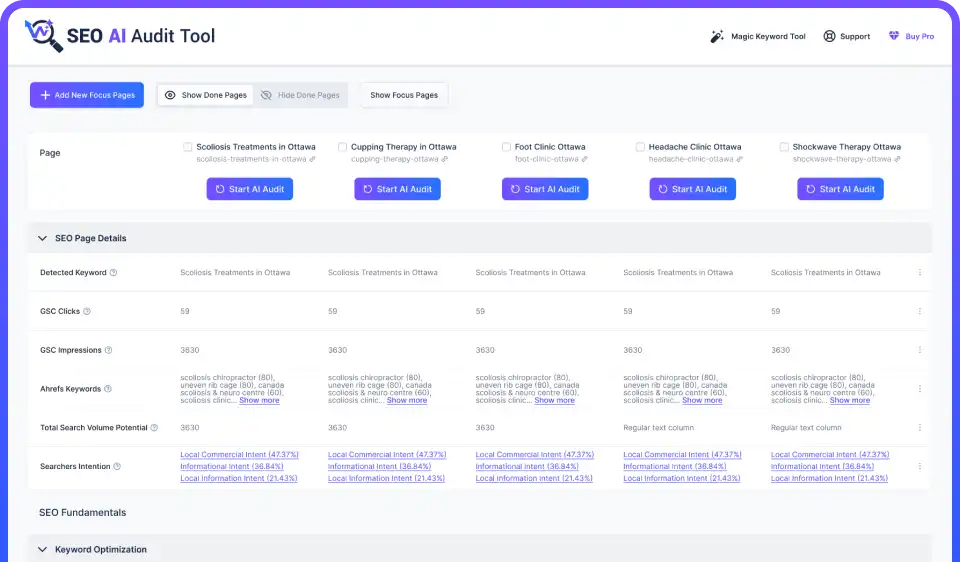
We built SAAT because we were tired of the same workflow: crawl in one tool, keyword data in another, AI suggestions in a third, findings pasted into a spreadsheet, and a VA left guessing what "improve E-E-A-T" was supposed to mean.
| Audit task | How SAAT helps | What still needs a human |
|---|---|---|
| Page-level SEO checks | Runs structured checks on keywords, titles, descriptions, headings, content, links, images | Confirm relevance and implementation quality |
| Search intent | Classifies page-level intent, flags commercial opportunities | Validate against real SERPs and business goals |
| Content and E-E-A-T | AI-assisted analysis surfaces quality and trust gaps | Verify facts, expertise, legal claims, tone |
| CRO review | Checks FAQs, tables, media, readability, conversion signals | Decide what genuinely improves the journey |
| Performance data | Imports GSC and Ahrefs CSVs for richer prioritization | Choose date ranges, interpret anomalies |
| Metadata | Generates and organizes draft titles and descriptions | Review accuracy, intent, differentiation, SERP fit |
| Focus Pages | Selects and tracks priority pages instead of treating every URL the same | Set the commercial priorities |
| Bulk workflows | Groups repeated fixes across many pages | Stage, sample, back up, verify |
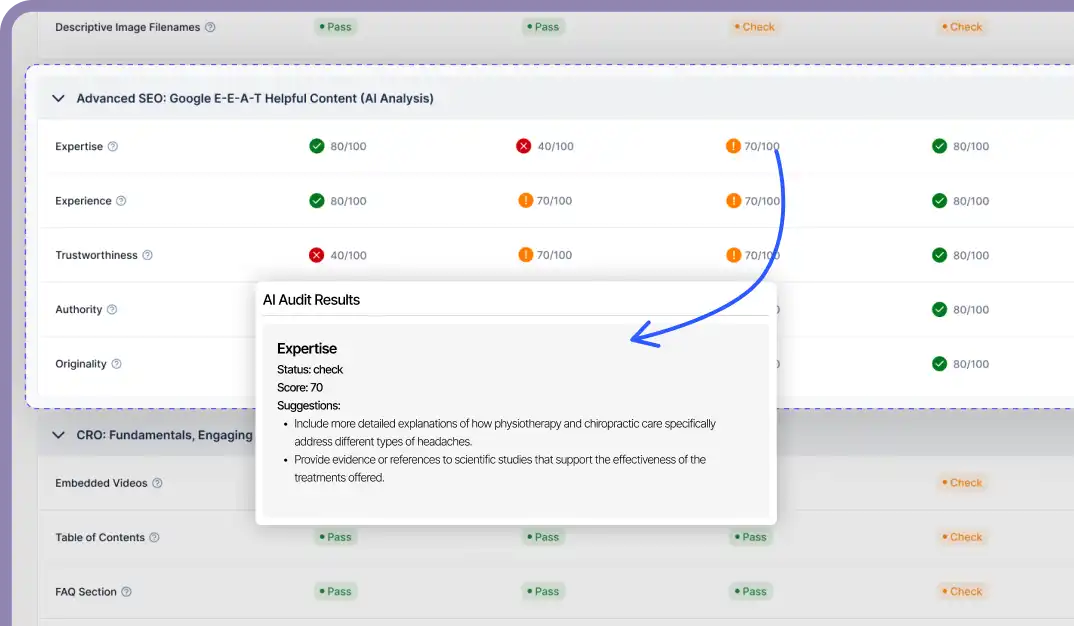
Step 6 deserves a note. The point of AI-assisted auditing isn't to accept 40 suggestions in one click. It's to get 40 suggestions in ten seconds instead of two hours, then spend your judgment on which eight are right for that page.
We'd rather tell you this up front than have you find out in month two. A responsible WordPress SEO audit still needs:
Automation gives you consistency and speed. Judgment decides what deserves to rank, what deserves to exist, and what will actually help the person reading. Not sure which parts to automate first, send us your setup and we'll tell you honestly.
Free plan available, single site, lifetime. Import your GSC and Ahrefs data, pick your Focus Pages, and see what your audit has been missing.
Here’s the whole thing in one place. Tick items as you go, filter by priority, and use the progress bar to see how much is left. Nothing is saved, so export or screenshot before you close the tab.
Interactive tool
0 of 0 checks complete
Start with the critical items. Nothing is saved, so export before you close the tab.
Working through this by hand takes hours per page. SAAT runs most of these checks inside your WordPress dashboard.
Run a WordPress SEO Audit →If you’d rather not track this manually, SAAT runs most of these checks for you and keeps the results next to the pages they belong to.
A WordPress SEO audit is a structured review of a site’s technical accessibility, indexability, on-page optimization, content, links, images, schema, speed, and conversion paths. It finds what’s stopping search engines or people from finding, understanding, trusting, or acting on your important pages.
Confirm the site is indexable, then check robots.txt, sitemaps, canonicals, status codes, redirects, mobile rendering, and Core Web Vitals. Next, review titles, headings, search intent, content quality, internal links, images, schema, and CTAs. Combine automated checks with Search Console data and manual review of your priority pages.
Light audit monthly, full audit quarterly. Audit sooner after a redesign, migration, theme or SEO-plugin change, big content launch, security issue, Search Console warning, or an unexplained traffic drop.
Accidental noindex settings, blocked resources, duplicate metadata or schema, broken links, redirect chains, weak canonicalization, plugin conflicts, oversized images, slow templates, messy headings, orphan pages, thin content, and pages targeting the wrong search intent.
WordPress gives you a solid, flexible foundation with editable URLs, content, media, and templates. It is not optimized out of the box. Your theme, plugins, hosting, configuration, content quality, architecture, and maintenance habits decide how the site performs.
It depends on your scope. Look for transparent checks, current compatibility, clear explanations, actionable recommendations, safe workflows, export options, and useful data integrations. SAAT fits teams that want AI-assisted page reviews, intent prioritization, CRO checks, Focus Pages, and optional GSC/Ahrefs data inside WordPress. Any plugin should complement Search Console, crawling, and expert judgment, not replace them.
Yes. AI speeds up repetitive checks, classifies intent, summarizes issues, reviews structure, and drafts metadata and action items. Humans still verify technical behaviour, facts, sources, brand fit, legal claims, and implementation quality.
Indexability. Confirm the production site isn’t discouraged from indexing, that important pages have no noindex directive, and that bots can reach the content. Then status codes, canonicals, redirects, sitemaps, and mobile rendering. Metadata comes later.
Review Reading and Permalink settings, robots.txt, XML sitemaps, meta robots and X-Robots-Tag headers, canonicals, status codes, redirects, duplicate URLs, HTTPS, architecture, JavaScript rendering, Core Web Vitals, mobile usability, and plugin or theme output. Use a crawler, Search Console, and browser dev tools.
Give each page one clear purpose and intent. Align the title, H1, opening answer, headings, content, internal links, images, and CTA with that purpose. Cut repetition, add evidence and examples, update anything outdated, and make the next step relevant.
Yes, both ways. Plugins improve metadata, sitemaps, caching, images, redirects, and schema. They also create duplicate output, slow pages, break rendering, and conflict after updates. Audit what each one adds, and assign one owner per SEO function.
A full toolkit usually includes Google Search Console, analytics, PageSpeed Insights, browser dev tools, a technical crawler, a keyword or backlink platform, schema validators, and a WordPress SEO audit plugin. SAAT adds AI-assisted page audits, intent analysis, Focus Pages, metadata workflows, CRO checks, and optional GSC/Ahrefs imports inside WordPress.
A focused audit of a small site takes a few hours. A full audit of a large or complex site can take days or weeks. It depends on URL count, templates, integrations, data quality, history, and how deep the content and conversion review goes. Automation cuts the repetitive checking, not the strategic decisions.
A good SEO audit for WordPress isn't a score-chasing exercise. It's a decision system.
Confirm the right pages are reachable and indexable. Kill the technical waste. Match every priority page to a real search intent. Improve content and internal links. Validate the schema. Make the next step obvious. Then do it again next quarter, because WordPress sites drift. Themes update, plugins pile up, writers publish, and the tidy site you audited in January is a different site by June.
If you only do three things this week: confirm your money pages are indexable, find every commercial page sitting in positions 4 to 20, and add internal links to the ones that don't have any.
That's a couple of hours of work. It beats a 200-item report nobody opens.
The best audits also know the difference between work a machine repeats perfectly and decisions a person has to make with context. Use automation to find patterns and organize the work. Use judgment for everything else. For migrations, architecture changes, or broader strategy, Designful's SEO services can handle the parts a plugin shouldn't.
Start with one page. The one that makes you money and isn't ranking where it should. Everything in this checklist applies to it right now.
Install SEO AI Audit Tool, pick five Focus Pages, and work through the checklist above. Most teams find their first fixable revenue problem in under an hour.